In this paper, we propose the Neural Knowledge DNA, a framework that tailors the ideas underlying the success of neural networks to the scope of knowledge representation. Knowledge representation is a fundamental field that dedicate to representing information about the world in a form that computer systems can utilize to solve complex tasks. The proposed Neural Knowledge DNA is designed to support discovering, storing, reusing, improving, and sharing knowledge among machines and organisation. It is constructed in a similar fashion of how DNA formed: built up by four essential elements. As the DNA produces phenotypes, the Neural Knowledge DNA carries information and knowledge via its four essential elements, namely, Networks, Experiences, States, and Actions.
We present an algorithm for building rule lists that is two orders of magnitude faster than previous work. Rule list algorithms are competitors for decision tree algorithms. They are associative classifiers, in that they are built from pre-mined association rules. They have a logical structure that is a sequence of IF-THEN rules, identical to a decision list or one-sided decision tree. Instead of using greedy splitting and pruning like decision tree algorithms, we fully optimize over rule lists, striking a practical balance between accuracy, interpretability, and computational speed. The algorithm presented here uses a mixture of theoretical bounds (tight enough to have practical implications as a screening or bounding procedure), computational reuse, and highly tuned language libraries to achieve computational efficiency. Currently, for many practical problems, this method achieves better accuracy and sparsity than decision trees; further, in many cases, the computational time is practical and often less than that of decision trees.
Recently, Neural Turing Machine and Memory Networks have shown that adding an external memory can greatly ameliorate a traditional recurrent neural network's tendency to forget after a long period of time. Here we present a new design of an external memory, wherein memories are stored in an Euclidean key space $\mathbb R^n$. An LSTM controller performs read and write via specialized structures called read and write heads, following the design of Neural Turing Machine. It can move a head by either providing a new address in the key space (aka random access) or moving from its previous position via a Lie group action (aka Lie access). In this way, the "L" and "R" instructions of a traditional Turing Machine is generalized to arbitrary elements of a fixed Lie group action. For this reason, we name this new model the Lie Access Neural Turing Machine, or LANTM.
We tested two different configurations of LANTM against an LSTM baseline in several basic experiments. As LANTM is differentiable end-to-end, training was done with RMSProp. We found the right configuration of LANTM to be capable of learning different permutation and arithmetic tasks and extrapolating to at least twice the input size, all with the number of parameters 2 orders of magnitude below that for the LSTM baseline. In particular, we trained LANTM on addition of $k$-digit numbers for $2 \le k \le 16$, but it was able to generalize almost perfectly to $17 \le k \le 32$.
Off-policy reinforcement learning has many applications including: learning from demonstration, learning multiple goal seeking policies in parallel, and representing predictive knowledge. Recently there has been an proliferation of new policy-evaluation algorithms that fill a longstanding algorithmic void in reinforcement learning: combining robustness to off-policy sampling, function approximation, linear complexity, and temporal difference (TD) updates. This paper contains two main contributions. First, we derive two new hybrid TD policy-evaluation algorithms, which fill a gap in this collection of algorithms. Second, we perform an empirical comparison to elicit which of these new linear TD methods should be preferred in different situations, and make concrete suggestions about practical use.
Characterizations of semi-stable and stage extensions in terms of 2-valued logical models are presented. To this end, the so-called GL-supported and GL-stage models are defined. These two classes of logical models are logic programming counterparts of the notion of range which is an established concept in argumentation semantics.
Route choice in multimodal networks shows a considerable variation between different individuals as well as the current situational context. Personalization of recommendation algorithms are already common in many areas, e.g., online retail. However, most online routing applications still provide shortest distance or shortest travel-time routes only, neglecting individual preferences as well as the current situation. Both aspects are of particular importance in a multimodal setting as attractivity of some transportation modes such as biking crucially depends on personal characteristics and exogenous factors like the weather. This paper introduces the FAVourite rOUte Recommendation (FAVOUR) approach to provide personalized, situation-aware route proposals based on three steps: first, at the initialization stage, the user provides limited information (home location, work place, mobility options, sociodemographics) used to select one out of a small number of initial profiles. Second, based on this information, a stated preference survey is designed in order to sharpen the profile. In this step a mass preference prior is used to encode the prior knowledge on preferences from the class identified in step one. And third, subsequently the profile is continuously updated during usage of the routing services. The last two steps use Bayesian learning techniques in order to incorporate information from all contributing individuals. The FAVOUR approach is presented in detail and tested on a small number of survey participants. The experimental results on this real-world dataset show that FAVOUR generates better-quality recommendations w.r.t. alternative learning algorithms from the literature. In particular the definition of the mass preference prior for initialization of step two is shown to provide better predictions than a number of alternatives from the literature.
A key problem in reinforcement learning for control with general function approximators (such as deep neural networks and other nonlinear functions) is that, for many algorithms employed in practice, updates to the policy or $Q$-function may fail to improve performance---or worse, actually cause the policy performance to degrade. Prior work has addressed this for policy iteration by deriving tight policy improvement bounds; by optimizing the lower bound on policy improvement, a better policy is guaranteed. However, existing approaches suffer from bounds that are hard to optimize in practice because they include sup norm terms which cannot be efficiently estimated or differentiated. In this work, we derive a better policy improvement bound where the sup norm of the policy divergence has been replaced with an average divergence; this leads to an algorithm, Easy Monotonic Policy Iteration, that generates sequences of policies with guaranteed non-decreasing returns and is easy to implement in a sample-based framework.
Natural languages can express some logical propositions that humans are able to understand. We illustrate this fact with a famous text that Conan Doyle attributed to Holmes: 'It is an old maxim of mine that when you have excluded the impossible, whatever remains, however improbable, must be the truth'. This is a subtle logical statement usually felt as an evident truth. The problem we are trying to solve is the cognitive reason for such a feeling. We postulate here that we accept Holmes' maxim as true because our adult brains are equipped with neural modules that naturally perform modal logical computations.
Biomedical taxonomies, thesauri and ontologies in the form of the International Classification of Diseases (ICD) as a taxonomy or the National Cancer Institute Thesaurus as an OWL-based ontology, play a critical role in acquiring, representing and processing information about human health. With increasing adoption and relevance, biomedical ontologies have also significantly increased in size. For example, the 11th revision of the ICD, which is currently under active development by the WHO contains nearly 50,000 classes representing a vast variety of different diseases and causes of death. This evolution in terms of size was accompanied by an evolution in the way ontologies are engineered. Because no single individual has the expertise to develop such large-scale ontologies, ontology-engineering projects have evolved from small-scale efforts involving just a few domain experts to large-scale projects that require effective collaboration between dozens or even hundreds of experts, practitioners and other stakeholders. Understanding how these stakeholders collaborate will enable us to improve editing environments that support such collaborations. We uncover how large ontology-engineering projects, such as the ICD in its 11th revision, unfold by analyzing usage logs of five different biomedical ontology-engineering projects of varying sizes and scopes using Markov chains. We discover intriguing interaction patterns (e.g., which properties users subsequently change) that suggest that large collaborative ontology-engineering projects are governed by a few general principles that determine and drive development. From our analysis, we identify commonalities and differences between different projects that have implications for project managers, ontology editors, developers and contributors working on collaborative ontology-engineering projects and tools in the biomedical domain.
Competing with top human players in the ancient game of Go has been a long-term goal of artificial intelligence. Go's high branching factor makes traditional search techniques ineffective, even on leading-edge hardware, and Go's evaluation function could change drastically with one stone change. Recent works [Maddison et al. (2015); Clark & Storkey (2015)] show that search is not strictly necessary for machine Go players. A pure pattern-matching approach, based on a Deep Convolutional Neural Network (DCNN) that predicts the next move, can perform as well as Monte Carlo Tree Search (MCTS)-based open source Go engines such as Pachi [Baudis & Gailly (2012)] if its search budget is limited. We extend this idea in our bot named darkforest, which relies on a DCNN designed for long-term predictions. Darkforest substantially improves the win rate for pattern-matching approaches against MCTS-based approaches, even with looser search budgets. Against human players, the newest versions, darkfores2, achieve a stable 3d level on KGS Go Server as a ranked bot, a substantial improvement upon the estimated 4k-5k ranks for DCNN reported in Clark & Storkey (2015) based on games against other machine players. Adding MCTS to darkfores2 creates a much stronger player named darkfmcts3: with 5000 rollouts, it beats Pachi with 10k rollouts in all 250 games; with 75k rollouts it achieves a stable 5d level in KGS server, on par with state-of-the-art Go AIs (e.g., Zen, DolBaram, CrazyStone) except for AlphaGo [Silver et al. (2016)]; with 110k rollouts, it won the 3rd place in January KGS Go Tournament.
We present an alternative methodology for the analysis of algorithms, based on the concept of expected discounted reward. This methodology naturally handles algorithms that do not always terminate, so it can (theoretically) be used with partial algorithms for undecidable problems, such as those found in artificial general intelligence (AGI) and automated theorem proving. We mention new approaches to self-improving AGI and logical uncertainty enabled by this methodology.
Composer, Anonymous. Key, C Ionian mode. First Publication, 1480s in Bologna Ms Q.16 (No.26). Language, French. Piece Style, Renaissance.
from Google Alert - anonymous http://ift.tt/1TNcjgH'en_vois_(Anonymous)&ct=ga&cd=CAIyGjgxMzAxNTQ0ZWE3M2NhMmQ6Y29tOmVuOlVT&usg=AFQjCNEgaFf96D42lZwRoIwa8eRCr4N-cQ
via IFTTT
Flybrix Play with #robotics & #engineering using Flybrix. It's a programable toy LEGO #drone kit. Comes with a cool app for flight controls and airframe ideas #makerED
Document Title: =============== Fing v3.3.0 iOS - Persistent Mail Encoding Vulnerability References (Source): ==================== http://ift.tt/1oSZkgT Release Date: ============= 2016-02-29 Vulnerability Laboratory ID (VL-ID): ==================================== 1772 Common Vulnerability Scoring System: ==================================== 3.5 Product & Service Introduction: =============================== Find out which devices are connected to your Wi-Fi network, in just a few seconds. Fast and accurate, Fing is a professional App for network analysis. A simple and intuitive interface helps you evaluate security levels, detect intruders and resolve network issues. Discovers all devices connected to a Wi-Fi network. Unlimited devices and unlimited networks, for free! (Copy of the Homepage: http://ift.tt/18sOC71 ) Abstract Advisory Information: ============================== The Vulnerability Laboratory Core Research Team discovered an application-side mail encoding web vulnerability in the official Fing mobile iOS application. Vulnerability Disclosure Timeline: ================================== 2016-02-29: Public Disclosure (Vulnerability Laboratory) Discovery Status: ================= Published Affected Product(s): ==================== Overlook Soft Product: Fing - iOS (Web-Application) 3.3.0 Exploitation Technique: ======================= Local Severity Level: =============== Medium Technical Details & Description: ================================ An application-side input validation web vulnerability has been discovered in the official Fing mobile iOS web-application. The security web vulnerability allows to inject malicious script codes to the application-side of the vulnerable iOS mobile app. The vulnerability is located in the encode mechanism of the `Address` input field. Local attackers with restricted or privileged web-application user accounts are able to inject the address input to the mail body message context on sharing. The attacker injects a new Hostname Address to scan and shares the input context mail mail to the addressbook. The injection point is the Address input field and the execution point is the mail message body context. The security risk of the application-side vulnerability is estimated as medium with a cvss (common vulnerability scoring system) count of 3.5. Exploitation of the persistent web vulnerability requires a low privileged ios device account with restricted access and low user interaction. Successful exploitation of the vulnerabilities results in persistent phishing mails, session hijacking, persistent external redirect to malicious sources and application-side manipulation of affected or connected module context. Vulnerable Module(s) [+] Edit Scan (Add Hostname) Vulnerable Input(s): [+] Address Vulnerable Parameter(s) [+] hostname Affected Module(s) [+] Mail Message Body (Share Function) Proof of Concept (PoC): ======================= The application-side validation web vulnerability can be exploited by remote attackers with low privileged iOS device user account and without user interaction. For security demonstration or to reproduce the vulnerability follow the provided information and steps below to continue. Manual steps to reproduce the vulnerability ... 1. Install the Fing Scanner iOS app 2. Start the app 3. Click the second button in the bottom menu to edit a scan 4. Inject a script code payload to the "Address / Hostname" input field 5. Now click above the share button and choose send by email Note: The payload of the scan is not getting saved to the mail body message context 6. The execution occurs directly in the mail body of the email context 7. Successful reproduce of the vulnerability! PoC: Find (Send by Mail to Share)
Betreff: Fing discovery report for "><img>%20<iframe>%20<iframe src="x"> (No address)
Von: Benjamin Mejri Kunz <vulnerabilitylab@icloud.com>
While celebrating its computer's fourth birthday, the Raspberry Pi Foundation has launched a brand new Raspberry Pi today. Great news for all Micro-computing fans – A new, powerful Raspberry Pi 3 Model B in town. Months after introducing just $5 Raspberry Pi Zero, Raspberry Pi Foundation has introduced its third major version of the Raspberry Pi, the successor of the Raspberry Pi 2
from The Hacker News http://ift.tt/1XVhKJJ
via IFTTT
How do I write video clipscontaining interesting eventsto file rather than theentire video?
In this case, the overall goal is to construct a video synopsis, distilling the most key, salient, and interesting parts of the video stream into a series of short video files.
What actually defines a “key or interesting event” is entirely up to you and your application. Potential examples of key events can include:
Motion being detected in a restricted access zone.
An intruder entering your house or apartment.
A car running a stop sign on a busy street by your home.
In each of these cases, you’re not interested in the entire video capture — instead, you only want the video clip that contains the action!
To see how capturing key event video clips with OpenCV is done (and build your own video synopsis), just keep reading.
The purpose of this blog post is to demonstrate how to write short video clips to file when a particular action takes place. We’ll be using our knowledge gained from last week’s blog post on writing video to file with OpenCV to implement this functionality.
As I mentioned at the top of this post, defining “key” and “interesting” events in a video stream is entirely dependent on your application and the overalls goals of what you’re trying to build.
You might be interesting in detecting motion in a room. Monitoring your house. Or creating a system to observe traffic and store clips of motor vehicle drivers breaking the law.
As a simple example of both:
Defining a key event.
Writing the video clip to file containing the event.
We’ll be processing a video streaming and looking for occurrences of this green ball:
Figure 1: An example of the green ball we are going to detect in video streams.
If this green ball appears in our video stream, we’ll open up a new file video (based on the timestamp of occurrence), write the clip to file, and then stop the writing process once the ball disappears from our view.
Furthermore, our implementation will have a number of desirable properties, including:
Writing frames to our video file a few seconds before the action takes place.
Writing frames to file a few seconds after the action finishes — in both cases, our goal is to not only capture the entire event, but also the context of the event as well.
Utilizing threads to ensure our main program is not slowed down when performing I/O on both the input stream and the output video clip file.
Leveraging built-in Python data structures such as
deque
and
Queue
so we need not rely on external libraries (other than OpenCV and imutils, of course).
Project structure
Before we get started implementing our key event video writer, let’s look at the project structure:
file. This class will handle accepting frames from an input video stream ad writing them to file in a safe, efficient, and threaded manner.
The driver script,
save_key_events.py
, will define the criteria of what an “interesting event” is (i.e., the green ball entering the view of the camera), followed by passing these frames on to the
KeyClipWriter
which will then create our video synopsis.
A quick note on Python + OpenCV versions
This blog post assumes you are using Python 3+ and OpenCV 3. As I mentioned in last week’s post, I wasn’t able to get the
cv2.VideoWriter
function to work on my OpenCV 2.4 installation, so after a few hours of hacking around with no luck, I ended up abandoning OpenCV 2.4 for this project and sticking with OpenCV 3.
The code in this lesson is technically compatible with Python 2.7 (again, provided you are using Python 2.7 with OpenCV 3 bindings), but you’ll need to change a few
import
statements (I’ll point these out along the way).
Writing key/interesting video clips to file with OpenCV
Let’s go ahead and get started reviewing our
KeyClipWriter
class:
# import the necessary packages
from collections import deque
from threading import Thread
from queue import Queue
import time
import cv2

class KeyClipWriter:
        def __init__(self, bufSize=64, timeout=1.0):
                # store the maximum buffer size of frames to be kept
                # in memory along with the sleep timeout during threading
                self.bufSize = bufSize
                self.timeout = timeout

                # initialize the buffer of frames, queue of frames that
                # need to be written to file, video writer, writer thread,
                # and boolean indicating whether recording has started or not
                self.frames = deque(maxlen=bufSize)
                self.Q = None
                self.writer = None
                self.thread = None
                self.recording = False
We start off by importing our required Python packages on Lines 2-6. This tutorial assumes you are using Python 3, so if you’re using Python 2.7, you’ll need to change Line 4 from
from queue import Queue
to simply
import Queue
.
Line 9 defines the constructor to our
KeyClipWriter
, which accepts two optional parameters:
bufSize
: The maximum number of frames to be keep cached in an in-memory buffer.
timeout
: An integer representing the number of seconds to sleep for when (1) writing video clips to file and (2) there are no frames ready to be written.
We then initialize four important variables on Lines 18-22:
frames
: A buffer used to a store a maximum of
bufSize
frames that have been most recently read from the video stream.
Q
: A “first in, first out” (FIFO) Python Queue data structure used to hold frames that are awaiting to be written to video file.
writer
: An instantiation of the
cv2.VideoWriter
class used to actually write frames to the output video file.
thread
: A Python
Thread
instance that we’ll use when writing videos to file (to avoid costly I/O latency delays).
recording
: Boolean value indicating whether or not we are in “recording mode”.
Next up, let’s review the
update
method:
# import the necessary packages
from collections import deque
from threading import Thread
from queue import Queue
import time
import cv2

class KeyClipWriter:
        def __init__(self, bufSize=64, timeout=1.0):
                # store the maximum buffer size of frames to be kept
                # in memory along with the sleep timeout during threading
                self.bufSize = bufSize
                self.timeout = timeout

                # initialize the buffer of frames, queue of frames that
                # need to be written to file, video writer, writer thread,
                # and boolean indicating whether recording has started or not
                self.frames = deque(maxlen=bufSize)
                self.Q = None
                self.writer = None
                self.thread = None
                self.recording = False

        def update(self, frame):
                # update the frames buffer
                self.frames.appendleft(frame)

                # if we are recording, update the queue as well
                if self.recording:
                        self.Q.put(frame)
The
update
function requires a single parameter, the
frame
read from our video stream. We take this
frame
and store it in our
frames
buffer (Line 26). And if we are already in recording mode, we’ll store the
frame
in the
Queue
as well so it can be flushed to video file (Lines 29 and 30).
In order to kick-off an actual video clip recording, we need a
start
method:
# import the necessary packages
from collections import deque
from threading import Thread
from queue import Queue
import time
import cv2

class KeyClipWriter:
        def __init__(self, bufSize=64, timeout=1.0):
                # store the maximum buffer size of frames to be kept
                # in memory along with the sleep timeout during threading
                self.bufSize = bufSize
                self.timeout = timeout

                # initialize the buffer of frames, queue of frames that
                # need to be written to file, video writer, writer thread,
                # and boolean indicating whether recording has started or not
                self.frames = deque(maxlen=bufSize)
                self.Q = None
                self.writer = None
                self.thread = None
                self.recording = False

        def update(self, frame):
                # update the frames buffer
                self.frames.appendleft(frame)

                # if we are recording, update the queue as well
                if self.recording:
                        self.Q.put(frame)

        def start(self, outputPath, fourcc, fps):
                # indicate that we are recording, start the video writer,
                # and initialize the queue of frames that need to be written
                # to the video file
                self.recording = True
                self.writer = cv2.VideoWriter(outputPath, fourcc, fps,
                        (self.frames[0].shape[1], self.frames[0].shape[0]), True)
                self.Q = Queue()

                # loop over the frames in the deque structure and add them
                # to the queue
                for i in range(len(self.frames), 0, -1):
                        self.Q.put(self.frames[i - 1])

                # start a thread write frames to the video file
                self.thread = Thread(target=self.write, args=())
                self.thread.daemon = True
                self.thread.start()
First, we update our
recording
boolean to indicate that we are in “recording mode”. Then, we initialize the
cv2.VideoWriter
using the supplied
outputPath
,
fourcc
, and
fps
provided to the
start
method, along with the frame spatial dimensions (i.e., width and height). For a complete review of the
used to store the frames ready to be written to file. We then loop over all frames in our
frames
buffer and add them to the queue.
Finally, we spawn a separate thread to handle writing frames to video — this way we don’t slow down our main video processing pipeline by waiting for I/O operations to complete.
As noted above, the
start
method creates a new thread, calling the
write
method used to write frames inside the
Q
to file. Let’s define this
write
method:
# import the necessary packages
from collections import deque
from threading import Thread
from queue import Queue
import time
import cv2

class KeyClipWriter:
        def __init__(self, bufSize=64, timeout=1.0):
                # store the maximum buffer size of frames to be kept
                # in memory along with the sleep timeout during threading
                self.bufSize = bufSize
                self.timeout = timeout

                # initialize the buffer of frames, queue of frames that
                # need to be written to file, video writer, writer thread,
                # and boolean indicating whether recording has started or not
                self.frames = deque(maxlen=bufSize)
                self.Q = None
                self.writer = None
                self.thread = None
                self.recording = False

        def update(self, frame):
                # update the frames buffer
                self.frames.appendleft(frame)

                # if we are recording, update the queue as well
                if self.recording:
                        self.Q.put(frame)

        def start(self, outputPath, fourcc, fps):
                # indicate that we are recording, start the video writer,
                # and initialize the queue of frames that need to be written
                # to the video file
                self.recording = True
                self.writer = cv2.VideoWriter(outputPath, fourcc, fps,
                        (self.frames[0].shape[1], self.frames[0].shape[0]), True)
                self.Q = Queue()

                # loop over the frames in the deque structure and add them
                # to the queue
                for i in range(len(self.frames), 0, -1):
                        self.Q.put(self.frames[i - 1])

                # start a thread write frames to the video file
                self.thread = Thread(target=self.write, args=())
                self.thread.daemon = True
                self.thread.start()

        def write(self):
                # keep looping
                while True:
                        # if we are done recording, exit the thread
                        if not self.recording:
                                return

                        # check to see if there are entries in the queue
                        if not self.Q.empty():
                                # grab the next frame in the queue and write it
                                # to the video file
                                frame = self.Q.get()
                                self.writer.write(frame)

                        # otherwise, the queue is empty, so sleep for a bit
                        # so we don't waste CPU cycles
                        else:
                                time.sleep(self.timeout)
Line 53 starts an infinite loop that will continue polling for new frames and writing them to file until our video recording has finished.
Lines 55 and 56 make a check to see if the recording should be stopped, and if so, we return from the thread.
Otherwise, if the
Q
is not empty, we grab the next frame and write it to the video file (Lines 59-63).
If there are no frames in the
Q
, we sleep for a bit so we don’t needlessly waste CPU cycles spinning (Lines 67 and 68). This is especially important when using the
Queue
data structure which is thread-safe, implying that we must acquire a lock/semaphore prior to updating the internal buffer. If we don’t call
time.sleep
when the buffer is empty, then the
write
and
update
methods will constantly be fighting for the lock. Instead, it’s best to let the writer sleep for a bit until there are a backlog of frames in the queue that need to be written to file.
We’ll also define a
flush
method which simply takes all frames left in the
Q
and dumps them to file:
# import the necessary packages
from collections import deque
from threading import Thread
from queue import Queue
import time
import cv2

class KeyClipWriter:
        def __init__(self, bufSize=64, timeout=1.0):
                # store the maximum buffer size of frames to be kept
                # in memory along with the sleep timeout during threading
                self.bufSize = bufSize
                self.timeout = timeout

                # initialize the buffer of frames, queue of frames that
                # need to be written to file, video writer, writer thread,
                # and boolean indicating whether recording has started or not
                self.frames = deque(maxlen=bufSize)
                self.Q = None
                self.writer = None
                self.thread = None
                self.recording = False

        def update(self, frame):
                # update the frames buffer
                self.frames.appendleft(frame)

                # if we are recording, update the queue as well
                if self.recording:
                        self.Q.put(frame)

        def start(self, outputPath, fourcc, fps):
                # indicate that we are recording, start the video writer,
                # and initialize the queue of frames that need to be written
                # to the video file
                self.recording = True
                self.writer = cv2.VideoWriter(outputPath, fourcc, fps,
                        (self.frames[0].shape[1], self.frames[0].shape[0]), True)
                self.Q = Queue()

                # loop over the frames in the deque structure and add them
                # to the queue
                for i in range(len(self.frames), 0, -1):
                        self.Q.put(self.frames[i - 1])

                # start a thread write frames to the video file
                self.thread = Thread(target=self.write, args=())
                self.thread.daemon = True
                self.thread.start()

        def write(self):
                # keep looping
                while True:
                        # if we are done recording, exit the thread
                        if not self.recording:
                                return

                        # check to see if there are entries in the queue
                        if not self.Q.empty():
                                # grab the next frame in the queue and write it
                                # to the video file
                                frame = self.Q.get()
                                self.writer.write(frame)

                        # otherwise, the queue is empty, so sleep for a bit
                        # so we don't waste CPU cycles
                        else:
                                time.sleep(self.timeout)

        def flush(self):
                # empty the queue by flushing all remaining frames to file
                while not self.Q.empty():
                        frame = self.Q.get()
                        self.writer.write(frame)
A method like this is used when a video recording has finished and we need to immediately flush all frames to file.
Finally, we define the
finish
method below:
# import the necessary packages
from collections import deque
from threading import Thread
from queue import Queue
import time
import cv2

class KeyClipWriter:
        def __init__(self, bufSize=64, timeout=1.0):
                # store the maximum buffer size of frames to be kept
                # in memory along with the sleep timeout during threading
                self.bufSize = bufSize
                self.timeout = timeout

                # initialize the buffer of frames, queue of frames that
                # need to be written to file, video writer, writer thread,
                # and boolean indicating whether recording has started or not
                self.frames = deque(maxlen=bufSize)
                self.Q = None
                self.writer = None
                self.thread = None
                self.recording = False

        def update(self, frame):
                # update the frames buffer
                self.frames.appendleft(frame)

                # if we are recording, update the queue as well
                if self.recording:
                        self.Q.put(frame)

        def start(self, outputPath, fourcc, fps):
                # indicate that we are recording, start the video writer,
                # and initialize the queue of frames that need to be written
                # to the video file
                self.recording = True
                self.writer = cv2.VideoWriter(outputPath, fourcc, fps,
                        (self.frames[0].shape[1], self.frames[0].shape[0]), True)
                self.Q = Queue()

                # loop over the frames in the deque structure and add them
                # to the queue
                for i in range(len(self.frames), 0, -1):
                        self.Q.put(self.frames[i - 1])

                # start a thread write frames to the video file
                self.thread = Thread(target=self.write, args=())
                self.thread.daemon = True
                self.thread.start()

        def write(self):
                # keep looping
                while True:
                        # if we are done recording, exit the thread
                        if not self.recording:
                                return

                        # check to see if there are entries in the queue
                        if not self.Q.empty():
                                # grab the next frame in the queue and write it
                                # to the video file
                                frame = self.Q.get()
                                self.writer.write(frame)

                        # otherwise, the queue is empty, so sleep for a bit
                        # so we don't waste CPU cycles
                        else:
                                time.sleep(self.timeout)

        def flush(self):
                # empty the queue by flushing all remaining frames to file
                while not self.Q.empty():
                        frame = self.Q.get()
                        self.writer.write(frame)

        def finish(self):
                # indicate that we are done recording, join the thread,
                # flush all remaining frames in the queue to file, and
                # release the writer pointer
                self.recording = False
                self.thread.join()
                self.flush()
                self.writer.release()
This method indicates that the recording has been completed, joins the writer thread with the main script, flushes the remaining frames in the
Q
to file, and finally releases the
cv2.VideoWriter
pointer.
Now that we have defined the
KeyClipWriter
class, we can move on to the driver script used to implement the “key/interesting event” detection.
Saving key events with OpenCV
In order to keep this blog post simple and hands-on, we’ll define our “key event” to be when this green ball enters our video stream:
Figure 2: An example of a key/interesting event in a video stream.
Once we see this green ball, we will call
KeyClipWriter
to write all frames that contain the green ball to file. Essentially, this will give us a set of short video clips that neatly summarizes the events of the entire video stream — in short, a video synopsis.
Of course, you can use this code as a boilerplate/starting point to defining your own actions — we’ll simply use the “green ball” event since we have covered it multiple times before on the PyImageSearch blog, including tracking object movement and ball tracking.
Before you proceed with the rest of this tutorial, make sure you have the imutils package installed on your system:
# import the necessary packages
from pyimagesearch.keyclipwriter import KeyClipWriter
from imutils.video import VideoStream
import argparse
import datetime
import imutils
import time
import cv2

# construct the argument parse and parse the arguments
ap = argparse.ArgumentParser()
ap.add_argument("-o", "--output", required=True,
        help="path to output directory")
ap.add_argument("-p", "--picamera", type=int, default=-1,
        help="whether or not the Raspberry Pi camera should be used")
ap.add_argument("-f", "--fps", type=int, default=20,
        help="FPS of output video")
ap.add_argument("-c", "--codec", type=str, default="MJPG",
        help="codec of output video")
ap.add_argument("-b", "--buffer-size", type=int, default=32,
        help="buffer size of video clip writer")
args = vars(ap.parse_args())
Lines 2-8 import our necessary Python packages while Lines 11-22 parse our command line arguments. The set of command line arguments are detailed below:
--output
: This is the path to the output directory where we will store the output video clips.
--picamera
: If you want to use your Raspberry Pi camera (rather than a builtin/USB webcam), then supply a value of
--picamera 1
. You can read more about accessing both builtin/USB webcams and the Raspberry Pi camera module (without changing a single line of code) in this post.
--fps
: This switch controls the desired FPS of your output video. This value should be similar to the number of frames per second your image processing pipeline can process.
: The size of the in-memory buffer used to store the most recently polled frames from the camera sensor. A larger
--buffer-size
will allow for more context before and after the “key event” to be included in the output video clip, while a smaller
--buffer-size
will store less frames before and after the “key event”.
Let’s perform some initialization:
# import the necessary packages
from pyimagesearch.keyclipwriter import KeyClipWriter
from imutils.video import VideoStream
import argparse
import datetime
import imutils
import time
import cv2

# construct the argument parse and parse the arguments
ap = argparse.ArgumentParser()
ap.add_argument("-o", "--output", required=True,
        help="path to output directory")
ap.add_argument("-p", "--picamera", type=int, default=-1,
        help="whether or not the Raspberry Pi camera should be used")
ap.add_argument("-f", "--fps", type=int, default=20,
        help="FPS of output video")
ap.add_argument("-c", "--codec", type=str, default="MJPG",
        help="codec of output video")
ap.add_argument("-b", "--buffer-size", type=int, default=32,
        help="buffer size of video clip writer")
args = vars(ap.parse_args())

# initialize the video stream and allow the camera sensor to
# warmup
print("[INFO] warming up camera...")
vs = VideoStream(usePiCamera=args["picamera"] > 0).start()
time.sleep(2.0)

# define the lower and upper boundaries of the "green" ball in
# the HSV color space
greenLower = (29, 86, 6)
greenUpper = (64, 255, 255)

# initialize key clip writer and the consecutive number of
# frames that have *not* contained any action
kcw = KeyClipWriter(bufSize=args["buffer_size"])
consecFrames = 0
Lines 26-28 initialize our
VideoStream
and allow the camera sensor to warmup.
From there, Lines 32 and 33 define the lower and upper color threshold boundaries for the green ball in the HSV color space. For more information on how we defined these color threshold values, please see this post.
Line 37 instantiates our
KeyClipWriter
using our supplied
--buffer-size
, along with initializing an integer used to count the number of consecutive frames that have not contained any interesting events.
We are now ready to start processing frames from our video stream:
# import the necessary packages
from pyimagesearch.keyclipwriter import KeyClipWriter
from imutils.video import VideoStream
import argparse
import datetime
import imutils
import time
import cv2

# construct the argument parse and parse the arguments
ap = argparse.ArgumentParser()
ap.add_argument("-o", "--output", required=True,
        help="path to output directory")
ap.add_argument("-p", "--picamera", type=int, default=-1,
        help="whether or not the Raspberry Pi camera should be used")
ap.add_argument("-f", "--fps", type=int, default=20,
        help="FPS of output video")
ap.add_argument("-c", "--codec", type=str, default="MJPG",
        help="codec of output video")
ap.add_argument("-b", "--buffer-size", type=int, default=32,
        help="buffer size of video clip writer")
args = vars(ap.parse_args())

# initialize the video stream and allow the camera sensor to
# warmup
print("[INFO] warming up camera...")
vs = VideoStream(usePiCamera=args["picamera"] > 0).start()
time.sleep(2.0)

# define the lower and upper boundaries of the "green" ball in
# the HSV color space
greenLower = (29, 86, 6)
greenUpper = (64, 255, 255)

# initialize key clip writer and the consecutive number of
# frames that have *not* contained any action
kcw = KeyClipWriter(bufSize=args["buffer_size"])
consecFrames = 0

# keep looping
while True:
        # grab the current frame, resize it, and initialize a
        # boolean used to indicate if the consecutive frames
        # counter should be updated
        frame = vs.read()
        frame = imutils.resize(frame, width=600)
        updateConsecFrames = True

        # blur the frame and convert it to the HSV color space
        blurred = cv2.GaussianBlur(frame, (11, 11), 0)
        hsv = cv2.cvtColor(blurred, cv2.COLOR_BGR2HSV)

        # construct a mask for the color "green", then perform
        # a series of dilations and erosions to remove any small
        # blobs left in the mask
        mask = cv2.inRange(hsv, greenLower, greenUpper)
        mask = cv2.erode(mask, None, iterations=2)
        mask = cv2.dilate(mask, None, iterations=2)

        # find contours in the mask
        cnts = cv2.findContours(mask.copy(), cv2.RETR_EXTERNAL,
                cv2.CHAIN_APPROX_SIMPLE)
        cnts = cnts[0] if imutils.is_cv2() else cnts[1]
On Line 41 we start to looping over frames from our video stream. Lines 45 and 46 read the next
frame
from the video stream and then resizes it to have a width of 600 pixels.
Further pre-processing is done on Lines 50 and 51 by blurring the image slightly and then converting the image from the RGB color space to the HSV color space (so we can apply our color thresholding).
The actual color thresholding is performed on Line 56 using the
cv2.inRange
function. This method finds all pixels p that are
greenLower <= p <= greenUpper
. We then perform a series of erosions and dilations to remove any small blobs left in the mask.
Finally, Lines 61-63 find contours in the thresholded image.
If you are confused about any step of this processing pipeline, I would suggest going back to our previous posts on ball tracking and object movement to further familiarize yourself with the topic.
We are now ready to check and see if the green ball was found in our image:
# import the necessary packages
from pyimagesearch.keyclipwriter import KeyClipWriter
from imutils.video import VideoStream
import argparse
import datetime
import imutils
import time
import cv2

# construct the argument parse and parse the arguments
ap = argparse.ArgumentParser()
ap.add_argument("-o", "--output", required=True,
        help="path to output directory")
ap.add_argument("-p", "--picamera", type=int, default=-1,
        help="whether or not the Raspberry Pi camera should be used")
ap.add_argument("-f", "--fps", type=int, default=20,
        help="FPS of output video")
ap.add_argument("-c", "--codec", type=str, default="MJPG",
        help="codec of output video")
ap.add_argument("-b", "--buffer-size", type=int, default=32,
        help="buffer size of video clip writer")
args = vars(ap.parse_args())

# initialize the video stream and allow the camera sensor to
# warmup
print("[INFO] warming up camera...")
vs = VideoStream(usePiCamera=args["picamera"] > 0).start()
time.sleep(2.0)

# define the lower and upper boundaries of the "green" ball in
# the HSV color space
greenLower = (29, 86, 6)
greenUpper = (64, 255, 255)

# initialize key clip writer and the consecutive number of
# frames that have *not* contained any action
kcw = KeyClipWriter(bufSize=args["buffer_size"])
consecFrames = 0

# keep looping
while True:
        # grab the current frame, resize it, and initialize a
        # boolean used to indicate if the consecutive frames
        # counter should be updated
        frame = vs.read()
        frame = imutils.resize(frame, width=600)
        updateConsecFrames = True

        # blur the frame and convert it to the HSV color space
        blurred = cv2.GaussianBlur(frame, (11, 11), 0)
        hsv = cv2.cvtColor(blurred, cv2.COLOR_BGR2HSV)

        # construct a mask for the color "green", then perform
        # a series of dilations and erosions to remove any small
        # blobs left in the mask
        mask = cv2.inRange(hsv, greenLower, greenUpper)
        mask = cv2.erode(mask, None, iterations=2)
        mask = cv2.dilate(mask, None, iterations=2)

        # find contours in the mask
        cnts = cv2.findContours(mask.copy(), cv2.RETR_EXTERNAL,
                cv2.CHAIN_APPROX_SIMPLE)
        cnts = cnts[0] if imutils.is_cv2() else cnts[1]

        # only proceed if at least one contour was found
        if len(cnts) > 0:
                # find the largest contour in the mask, then use it
                # to compute the minimum enclosing circle
                c = max(cnts, key=cv2.contourArea)
                ((x, y), radius) = cv2.minEnclosingCircle(c)
                updateConsecFrames = radius <= 10

                # only proceed if the redius meets a minimum size
                if radius > 10:
                        # reset the number of consecutive frames with
                        # *no* action to zero and draw the circle
                        # surrounding the object
                        consecFrames = 0
                        cv2.circle(frame, (int(x), int(y)), int(radius),
                                (0, 0, 255), 2)

                        # if we are not already recording, start recording
                        if not kcw.recording:
                                timestamp = datetime.datetime.now()
                                p = "{}/{}.avi".format(args["output"],
                                        timestamp.strftime("%Y%m%d-%H%M%S"))
                                kcw.start(p, cv2.VideoWriter_fourcc(*args["codec"]),
                                        args["fps"])
Line 66 makes a check to ensure that at least one contour was found, and if so, Line 69 and 70 find the largest contour in the mask (according to the area) and use this contour to compute the minimum enclosing circle.
If the radius of the circle meets a minimum suze of 10 pixels (Line 74), then we will assume that we have found the green ball. Lines 78-80 reset the number of
consecFrames
that do not contain any interesting events (since an interesting event is “currently happening”) and draw a circle highlighting our ball in the frame.
Finally, we make a check if to see if we are currently recording a video clip (Line 83). If not, we generate an output filename for the video clip based on the current timestamp and call the
start
method of the
KeyClipWriter
.
Otherwise, we’ll assume no key/interesting event has taken place:
# import the necessary packages
from pyimagesearch.keyclipwriter import KeyClipWriter
from imutils.video import VideoStream
import argparse
import datetime
import imutils
import time
import cv2

# construct the argument parse and parse the arguments
ap = argparse.ArgumentParser()
ap.add_argument("-o", "--output", required=True,
        help="path to output directory")
ap.add_argument("-p", "--picamera", type=int, default=-1,
        help="whether or not the Raspberry Pi camera should be used")
ap.add_argument("-f", "--fps", type=int, default=20,
        help="FPS of output video")
ap.add_argument("-c", "--codec", type=str, default="MJPG",
        help="codec of output video")
ap.add_argument("-b", "--buffer-size", type=int, default=32,
        help="buffer size of video clip writer")
args = vars(ap.parse_args())

# initialize the video stream and allow the camera sensor to
# warmup
print("[INFO] warming up camera...")
vs = VideoStream(usePiCamera=args["picamera"] > 0).start()
time.sleep(2.0)

# define the lower and upper boundaries of the "green" ball in
# the HSV color space
greenLower = (29, 86, 6)
greenUpper = (64, 255, 255)

# initialize key clip writer and the consecutive number of
# frames that have *not* contained any action
kcw = KeyClipWriter(bufSize=args["buffer_size"])
consecFrames = 0

# keep looping
while True:
        # grab the current frame, resize it, and initialize a
        # boolean used to indicate if the consecutive frames
        # counter should be updated
        frame = vs.read()
        frame = imutils.resize(frame, width=600)
        updateConsecFrames = True

        # blur the frame and convert it to the HSV color space
        blurred = cv2.GaussianBlur(frame, (11, 11), 0)
        hsv = cv2.cvtColor(blurred, cv2.COLOR_BGR2HSV)

        # construct a mask for the color "green", then perform
        # a series of dilations and erosions to remove any small
        # blobs left in the mask
        mask = cv2.inRange(hsv, greenLower, greenUpper)
        mask = cv2.erode(mask, None, iterations=2)
        mask = cv2.dilate(mask, None, iterations=2)

        # find contours in the mask
        cnts = cv2.findContours(mask.copy(), cv2.RETR_EXTERNAL,
                cv2.CHAIN_APPROX_SIMPLE)
        cnts = cnts[0] if imutils.is_cv2() else cnts[1]

        # only proceed if at least one contour was found
        if len(cnts) > 0:
                # find the largest contour in the mask, then use it
                # to compute the minimum enclosing circle
                c = max(cnts, key=cv2.contourArea)
                ((x, y), radius) = cv2.minEnclosingCircle(c)
                updateConsecFrames = radius <= 10

                # only proceed if the redius meets a minimum size
                if radius > 10:
                        # reset the number of consecutive frames with
                        # *no* action to zero and draw the circle
                        # surrounding the object
                        consecFrames = 0
                        cv2.circle(frame, (int(x), int(y)), int(radius),
                                (0, 0, 255), 2)

                        # if we are not already recording, start recording
                        if not kcw.recording:
                                timestamp = datetime.datetime.now()
                                p = "{}/{}.avi".format(args["output"],
                                        timestamp.strftime("%Y%m%d-%H%M%S"))
                                kcw.start(p, cv2.VideoWriter_fourcc(*args["codec"]),
                                        args["fps"])

        # otherwise, no action has taken place in this frame, so
        # increment the number of consecutive frames that contain
        # no action
        if updateConsecFrames:
                consecFrames += 1

        # update the key frame clip buffer
        kcw.update(frame)

        # if we are recording and reached a threshold on consecutive
        # number of frames with no action, stop recording the clip
        if kcw.recording and consecFrames == args["buffer_size"]:
                kcw.finish()

        # show the frame
        cv2.imshow("Frame", frame)
        key = cv2.waitKey(1) & 0xFF

        # if the `q` key was pressed, break from the loop
        if key == ord("q"):
                break
If no interesting event has happened, we update
consecFrames
and pass the
frame
over to our buffer.
Line 101 makes an important check — if we are recording and have reached a sufficient number of consecutive frameswith no key event, then we should stop the recording.
Finally, Lines 105-110 display the output
frame
to our screen and wait for a keypress.
Our final block of code ensures the video has been successfully closed and then performs a bit of cleanup:
# import the necessary packages
from pyimagesearch.keyclipwriter import KeyClipWriter
from imutils.video import VideoStream
import argparse
import datetime
import imutils
import time
import cv2

# construct the argument parse and parse the arguments
ap = argparse.ArgumentParser()
ap.add_argument("-o", "--output", required=True,
        help="path to output directory")
ap.add_argument("-p", "--picamera", type=int, default=-1,
        help="whether or not the Raspberry Pi camera should be used")
ap.add_argument("-f", "--fps", type=int, default=20,
        help="FPS of output video")
ap.add_argument("-c", "--codec", type=str, default="MJPG",
        help="codec of output video")
ap.add_argument("-b", "--buffer-size", type=int, default=32,
        help="buffer size of video clip writer")
args = vars(ap.parse_args())

# initialize the video stream and allow the camera sensor to
# warmup
print("[INFO] warming up camera...")
vs = VideoStream(usePiCamera=args["picamera"] > 0).start()
time.sleep(2.0)

# define the lower and upper boundaries of the "green" ball in
# the HSV color space
greenLower = (29, 86, 6)
greenUpper = (64, 255, 255)

# initialize key clip writer and the consecutive number of
# frames that have *not* contained any action
kcw = KeyClipWriter(bufSize=args["buffer_size"])
consecFrames = 0

# keep looping
while True:
        # grab the current frame, resize it, and initialize a
        # boolean used to indicate if the consecutive frames
        # counter should be updated
        frame = vs.read()
        frame = imutils.resize(frame, width=600)
        updateConsecFrames = True

        # blur the frame and convert it to the HSV color space
        blurred = cv2.GaussianBlur(frame, (11, 11), 0)
        hsv = cv2.cvtColor(blurred, cv2.COLOR_BGR2HSV)

        # construct a mask for the color "green", then perform
        # a series of dilations and erosions to remove any small
        # blobs left in the mask
        mask = cv2.inRange(hsv, greenLower, greenUpper)
        mask = cv2.erode(mask, None, iterations=2)
        mask = cv2.dilate(mask, None, iterations=2)

        # find contours in the mask
        cnts = cv2.findContours(mask.copy(), cv2.RETR_EXTERNAL,
                cv2.CHAIN_APPROX_SIMPLE)
        cnts = cnts[0] if imutils.is_cv2() else cnts[1]

        # only proceed if at least one contour was found
        if len(cnts) > 0:
                # find the largest contour in the mask, then use it
                # to compute the minimum enclosing circle
                c = max(cnts, key=cv2.contourArea)
                ((x, y), radius) = cv2.minEnclosingCircle(c)
                updateConsecFrames = radius <= 10

                # only proceed if the redius meets a minimum size
                if radius > 10:
                        # reset the number of consecutive frames with
                        # *no* action to zero and draw the circle
                        # surrounding the object
                        consecFrames = 0
                        cv2.circle(frame, (int(x), int(y)), int(radius),
                                (0, 0, 255), 2)

                        # if we are not already recording, start recording
                        if not kcw.recording:
                                timestamp = datetime.datetime.now()
                                p = "{}/{}.avi".format(args["output"],
                                        timestamp.strftime("%Y%m%d-%H%M%S"))
                                kcw.start(p, cv2.VideoWriter_fourcc(*args["codec"]),
                                        args["fps"])

        # otherwise, no action has taken place in this frame, so
        # increment the number of consecutive frames that contain
        # no action
        if updateConsecFrames:
                consecFrames += 1

        # update the key frame clip buffer
        kcw.update(frame)

        # if we are recording and reached a threshold on consecutive
        # number of frames with no action, stop recording the clip
        if kcw.recording and consecFrames == args["buffer_size"]:
                kcw.finish()

        # show the frame
        cv2.imshow("Frame", frame)
        key = cv2.waitKey(1) & 0xFF

        # if the `q` key was pressed, break from the loop
        if key == ord("q"):
                break

# if we are in the middle of recording a clip, wrap it up
if kcw.recording:
        kcw.finish()

# do a bit of cleanup
cv2.destroyAllWindows()
vs.stop()
Video synopsis results
To generate video clips for key events (i.e., the green ball appearing on our video stream), just execute the following command:
$ python save_key_events.py --output output
I’ve included the full 1m 46s video (without extracting salient clips) below:
After running the
save_key_events.py
script, I now have 4 output videos, one for each the time green ball was present in my video stream:
Figure 3: Creating a separate video clip for each interesting and key event.
The key event video clips are displayed below to demonstrate that our script is working properly, accurately extracting our “interesting events”, and essentially building a series of video clips functioning as a video synopsis:
Video clip #1:
Video clip #2:
Video clip #3:
Video clip #4:
Summary
In this blog post, we learned how to save key event video clips to file using OpenCV and Python.
Exactly what defines a “key or interesting event” is entirely dependent on your application and the goals of your overall project. Examples of key events can include:
Monitoring your front door for motion detection (i.e., someone entering your house).
Recognizing the face of an intruder as they enter your house.
Reporting unsafe driving outside your home to the authorities.
Again, exactly what constitutes a “key event” is near endless. However, regardless of how you define an interesting event, you can still use the Python code detailed in this post to help save these interesting events to file as a shortened video clip.
Using this methodology, you can condense hours of video stream footage into seconds of interesting events, effectively yielding a video synopsis — all generated using Python, computer vision, and image processing techniques.
Anyway, I hope you enjoyed this blog post!
If you did, please consider sharing it on your favorite social media outlet such as Facebook, Twitter, LinkedIn, etc. I put a lot of effort into the past two blog posts in this series and I would really appreciate it if you could help spread the word.
And before you, be sure to signup for the PyImageSearch Newsletter using the form below to receive email updates when new posts go live!
Burning and Suppression of Solids (BASS)-II: Kopra completed flame tests for the BASS-II investigation. BASS-II examines the burning and extinction characteristics of a wide variety of fuel samples in microgravity. The results of the BASS-II experiment will be used in the development of strategies for flammability screening of materials to be used in spacecraft as well as to provide valuable data on solid fuel burning behavior in microgravity. BASS-II results contribute to the combustion computational models used in the design of fire detection and suppression systems in microgravity and on Earth. Twins Study: In support of the Twins Study, Kelly continued his week-long Return minus 14 day daily saliva collections. This investigation is an integrated compilation of ten different studies led by multiple investigators. The studies take advantage of a unique opportunity to look at the effects of space travel on identical twins, with one of them experiencing space travel for a year while the other remains earth-bound for that same year. The study looks at changes in the human body that are important in the fields of genetics, psychology, physiology, microbiology, and immunology. Space Headaches: Peake completed his Weekly Space Headaches questionnaire today. Headaches can be a common complaint during spaceflight. This experiment will provide information that may help in the development of methods to alleviate associated symptoms and improvement in the well-being and performance of crew members in space. Soyuz 44 (44S) Nominal Descent Drill #2: The 44S Crew (Kelly, Kornienko, and Volkov) participated in a nominal Soyuz Decent Drill. As part of the training they reviewed preliminary undocking and descent data and worked through the descent timeline from Soyuz activation through post-landing activities. The 44S crew is scheduled to return to Earth next Tuesday, 01 March. Japanese Experiment Module (JEM) Stowage Frame Installation: Peake initiated the assembly and installation of the JEM Stowage Frame. Once fully installed, the frame will increase JEM stowage capability by 12 Cargo Transfer Bag Equivalents (CTBE). ВД2 anomaly: Late in the crew day, ВД2 experienced a failure in the vibration isolation system. This crew has experience with this repair, as an identical failure on the other side of ВД2 occurred recently, and spares are available onboard. Russian hardware specialists ВД2 to be recovered over the weekend. Urine Processing Assembly (UPA): The UPA was transitioned from shutdown to standby today, in order to prepare for purge and recovery of the UPA. Procedures are being developed to purge a clogged hose next week, and start the system after that purge. Remote Power Controller Module (RPCM) AL1A4A-B RPC-14 Trip: This morning, RPCM AL1A4A-B RPC-14 tripped open, and was verified to be a true overcurrent event. This RPC powers shell heaters on the joint airlock. Redundant heaters are operational. Today’s Planned Activities All activities were completed unless otherwise noted. Closure of window shutters 6,8,9,12,13,14 / r/g 6965 HRF – Sample Collection and Prep for Stowage Insertion T2 Treadmill Photo/TV. Reminder TWIN – Sample Collection NEIROIMMUNITET. Saliva Test / r/g 1535 CORRECTSIYA. Closeout Ops / r/g 1535 HRF – Sample Insertion into MELFI T2 Treadmill Photo/TV. Reminder Closing USOS Window Shutters Soyuz 718 СУД No.2 test in preparation for descent Orbital Flight 14 + r/g 1544 Vacuum Cleaning of ВД1 and ВД2 air ducts in MRM2 EVA Helmet Interchangeable Portable (EHIP) Batteries – Restow P/TV – Hardware Removal Soyuz 718 АСУ Activation (MRM2) / Ascent and Descent IMS Tagup Soyuz 718 Descent OBT r/g 1545, 1543, 1543 PBA Relocation EVA – Airlock Transfers Camcorder setup to capture T2 exercise Download Pille Dosimeter Readings / r/g 1542 JAXA Stowage Frame Installation Part 1 BIODEGRADATSIYA. Sample collection from structure surfaces and photography r/g 1546 Soyuz 718 (MRM2) Stowage Ops / r/g 1444 MATRYOSHKA-R. Removing ИД-3МКС Assemblies from Protective Curtain P/L / r/g 1540 WRS Maintenance In Flight Maintenance (IFM) – Waste and Hygiene Compartment (WHC) – Full Fill HAM radio session from Columbus Food Frequency Questionnaire HRF – Urine Collection Hardware Setup In Flight Maintenance (IFM) – Waste and Hygiene Compartment (WHC) – Full Fill INTERACTION-2. Experiment Ops / r/g 1541, 1541 Soyuz 718 Samsung tablet charge – initiate / Video & Audio WRS Maintenance Crew Departure Prep SHD – Questionnaire Formaldehyde Monitoring Kit (FMK) Stow Operations Progress 429 (Aft) Stowage for Disposal and IMS Ops / r/g 1484 Photo/TV Camcorder Setup Verification Charging Soyuz 718 Samsung tablet – termination /Video & Audio СОЖ Maintenance IMS Delta File Prep Stow Video Equipment to capture T2 Exercise Completed Task List Items None Ground Activities All activities were completed unless otherwise noted. Nominal System Commanding Three-Day Look Ahead: Saturday, 02/27: Crew off duty, weekly cleaning Sunday, 02/28: Crew off duty Monday, 02/29: CQ Cleaning, Sprint VO2, Fine Motor Skills, JEM Stowage Frame Install Part 2, Crew Departure Prep, Emergency Roles and Responsibilities Review, Change of Command Ceremony QUICK ISS Status – Environmental Control Group: Component Status Elektron On Vozdukh Manual [СКВ] 1 – SM Air Conditioner System (“SKV1”) On [СКВ] 2 – SM Air Conditioner System (“SKV2”) Off Carbon Dioxide Removal Assembly (CDRA) Lab Override Carbon Dioxide Removal Assembly (CDRA) Node 3 Operate Major Constituent Analyzer (MCA) Lab Idle Major Constituent Analyzer (MCA) Node 3 Operate Oxygen Generation Assembly (OGA) Process Urine Processing Assembly (UPA) Standby Trace Contaminant Control System (TCCS) Lab Off Trace Contaminant Control System (TCCS) Node 3 Full Up
from ISS On-Orbit Status Report http://ift.tt/1TKpJJ4
via IFTTT
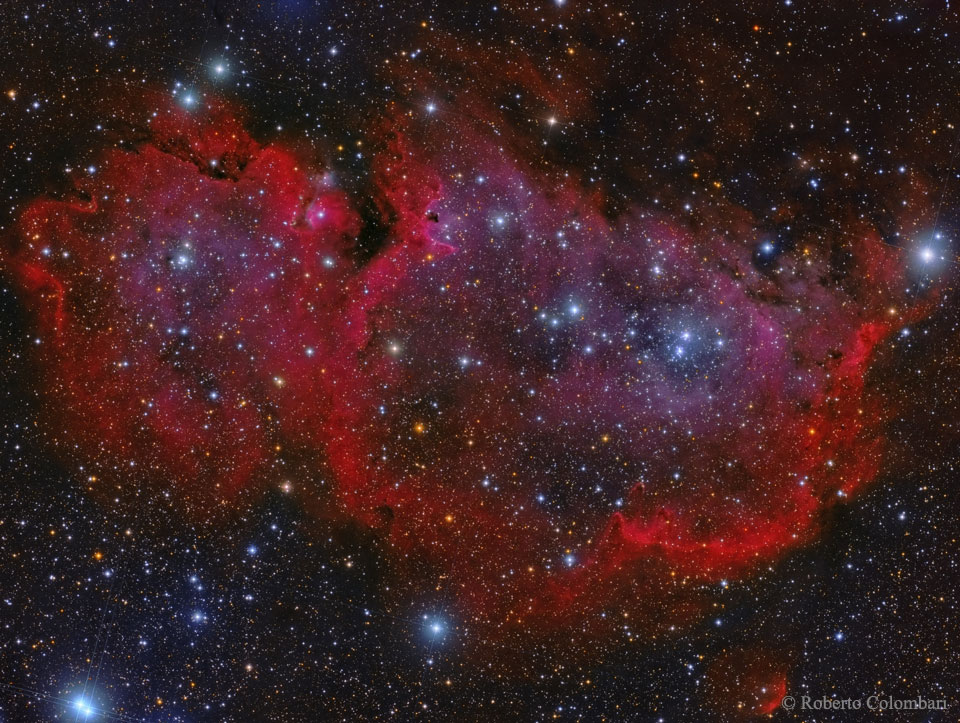
Stars are forming in the Soul of the Queen of Aethopia. More specifically, a large star forming region called the Soul Nebula can be found in the direction of the constellation Cassiopeia, who Greek mythology credits as the vain wife of a King who long ago ruled lands surrounding the upper Nile river. The Soul Nebula houses several open clusters of stars, a large radio source known as W5, and huge evacuated bubbles formed by the winds of young massive stars. Located about 6,500 light years away, the Soul Nebula spans about 100 light years and is usually imaged next to its celestial neighbor the Heart Nebula (IC 1805). The featured image appears mostly red due to the emission of a specific color of light emitted by excited hydrogen gas. via NASA http://ift.tt/1Rcu039
Quantum computer has an amazing potential of fast information processing. However, realisation of a digital quantum computer is still a challenging problem requiring highly accurate controls and key application strategies. Here we propose a novel platform, quantum reservoir computing, to solve these issues successfully by exploiting natural quantum dynamics, which is ubiquitous in laboratories nowadays, for machine learning. In this framework, nonlinear dynamics including classical chaos can be universally emulated in quantum systems. A number of numerical experiments show that quantum systems consisting of at most seven qubits possess computational capabilities comparable to conventional recurrent neural networks of 500 nodes. This discovery opens up a new paradigm for information processing with artificial intelligence powered by quantum physics.
Decision making is a vital function in the era of artificial intelligence; however, its physical realizations and their theoretical fundamentals are not yet known. In our former study [Sci. Rep. 5, 513253 (2015)], we demonstrated that single photons can be used to make decisions in uncertain, dynamically changing environments. The multi-armed bandit problem was successfully solved using the dual probabilistic and particle attributes of single photons. Herein, we present the category theoretic foundation of the single-photon-based decision making, including quantitative analysis that agrees well with the experimental results. The category theoretic model unveils complex interdependencies of the entities of the subject matter in the most simplified manner, including a dynamically changing environment. In particular, the octahedral structure in triangulated categories provides a clear understanding of the underlying mechanisms of the single-photon decision maker. This is the first demonstration of a category theoretic interpretation of decision making, and provides a solid understanding and a design fundamental for intelligence.
Mutation is one of the most important stages of the genetic algorithm because of its impact on the exploration of global optima, and to overcome premature convergence. There are many types of mutation, and the problem lies in selection of the appropriate type, where the decision becomes more difficult and needs more trial and error. This paper investigates the use of more than one mutation operator to enhance the performance of genetic algorithms. Novel mutation operators are proposed, in addition to two selection strategies for the mutation operators, one of which is based on selecting the best mutation operator and the other randomly selects any operator. Several experiments on some Travelling Salesman Problems (TSP) were conducted to evaluate the proposed methods, and these were compared to the well-known exchange mutation and rearrangement mutation. The results show the importance of some of the proposed methods, in addition to the significant enhancement of the genetic algorithm's performance, particularly when using more than one mutation operator.